

Most lakehouse conversations start with a beautiful architecture diagram. There is an object storage layer, a database or query engine, open table formats, governance, security, pipelines, and maybe some AI on top. On paper, everything makes sense. Then you try to build the first working version, and that is when the real friction starts.
You need to create or configure the database, prepare object storage, understand credentials, define schemas, decide where raw data should land, create loading patterns, validate the result, and troubleshoot errors that are often spread across different tools. Before you even run your first meaningful query, you are already dealing with setup details, connection problems, permissions, file paths, table definitions, and operational checks.
This is the part of the lakehouse journey that is usually underestimated. We talk a lot about the target architecture, but not enough about the first mile: the moment where someone wants to move from “I understand the concept” to “I have a working lakehouse loop that I can use, test, break, fix, and improve.”
This is also why I think the Always Free angle is important. One of the most attractive things about this setup is that you can have a permanent free environment to learn and experiment with data engineering concepts: object storage, database connections, schemas, loading patterns, SQL validation, troubleshooting, and operational checks. You do not need to start with a large enterprise platform or a complex production architecture. You can start small, break things safely, understand how the pieces fit together, and then add the agentic layer with OpenClaw on top. For anyone trying to learn data engineering, lakehouse patterns, or agentic workflows around data, this is a very powerful entry point.
That first mile is exactly the reason I started building Lakehouse Control Room with OpenClaw.
What I mean by Lakehouse Control Room
Lakehouse Control Room is my name for an agentic operating layer around the Oracle AI Lakehouse lifecycle.
Another way to think about it is as the beginning of an Agentic Data Engineer experience. Not an agent that replaces the data engineer, and not a black box that makes architectural decisions on its own, but an assistant that can help execute the repetitive parts of the data engineering loop: inspect the environment, understand the available files, prepare loading SQL, validate the result, troubleshoot errors, and summarize the evidence needed for the next decision. The human still owns the architecture, the data model, the approvals, and the final decisions. The agent helps reduce the operational friction between each step.
Yes, I built new skills for Autonomous AI Lakehouse
The architecture is intentionally simple: the user works with OpenClaw, OpenClaw uses lakehouse-specific skills, those skills interact with Oracle through SQLcl MCP, and Oracle Autonomous AI Lakehouse remains the runtime where data is loaded, queried, inspected, and validated.
The current architecture looks like this:
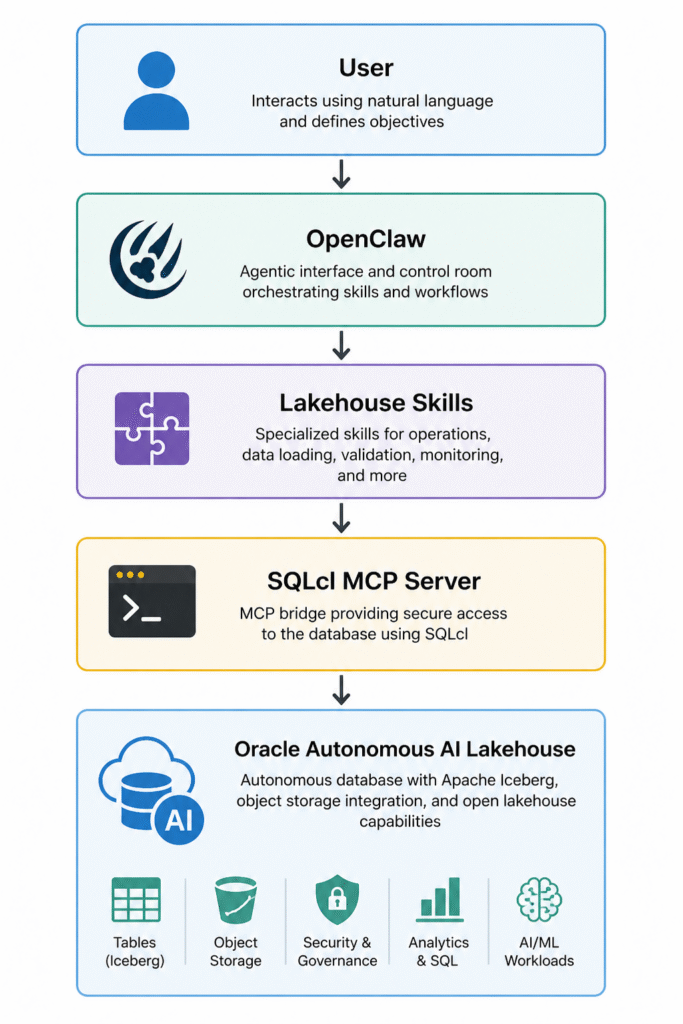
Each layer has a clear responsibility. OpenClaw is the agentic interface. The skills define specialized workflows. SQLcl MCP is the bridge that allows OpenClaw to interact with Oracle Database. Autonomous AI Lakehouse is the platform where data is loaded, queried, inspected, and validated. OCI Object Storage is the storage layer where the lakehouse files live.
In that sense, Lakehouse Control Room is less about asking an assistant random questions and more about giving an agent a set of well-defined data engineering playbooks.
I do not want one giant assistant that tries to do everything. I prefer a set of focused skills that understand specific parts of the lakehouse lifecycle and can work together through OpenClaw. That makes the system easier to reason about and much safer to extend. A data loading skill should not audit operator access. An operations skill should not run data loading operations. A future sharing skill should not diagnose blocking sessions.
For the first version, I created two skills: Autonomous Data Loader and Autonomous Ops Watch. The first one focuses on getting data into the lakehouse. The second one focuses on understanding what can be observed from SQL inside the connected Autonomous AI Lakehouse. Together, they form the first small version of a control room.
You can find the two skills here: LINK
Connecting OpenClaw to Autonomous AI Lakehouse
Before the skills can do anything useful, OpenClaw needs a controlled way to connect to Autonomous AI Lakehouse. For this first version, I use SQLcl MCP Server as the bridge between OpenClaw and Oracle Database.
What I liked about this step is that I did not configure everything manually from scratch. I asked OpenClaw to install and configure SQLcl MCP following the official Oracle documentation. The prompt was intentionally simple:
Install and configure SQLcl MCP following the official Oracle documentation so OpenClaw can connect to my Autonomous AI Lakehouse.OpenClaw then guided the setup process: checking SQLcl, validating that MCP mode was available, preparing the MCP server configuration, and registering it so it could be used from the OpenClaw environment. After the installation, I asked OpenClaw to validate the connection:
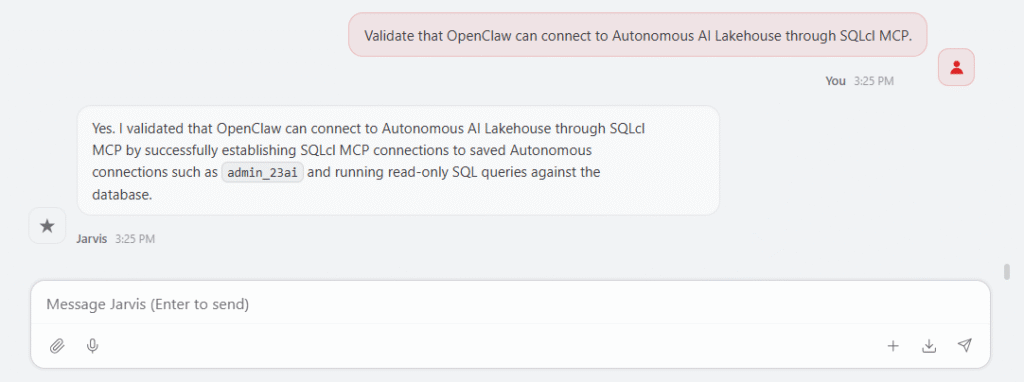
This first validation is important because it confirms that the control room is not only generating suggestions. It can actually reach the lakehouse environment through the SQLcl MCP bridge and start using the database tools needed by the skills. In my case, I have a few connections with different privileges. One of them is through ADMIN, which is useful for testing the operations skill later.
This is also where the agentic part becomes practical. I am not only asking an assistant to explain how SQLcl MCP works. I am asking it to help set up the bridge, validate the connection, and prepare the environment so the next workflows can run.
The first two skills
For the first version, I created two skills because every lakehouse project needs to answer two basic questions early: can I load data, and can I inspect what is happening? That is why the first two skills are Autonomous Data Loader and Autonomous Ops Watch.
The Autonomous Data Loader skill focuses on one of the most important first milestones in any lakehouse project: getting data in. Its purpose is to help load data from OCI Object Storage into Oracle Autonomous AI Lakehouse using DBMS_CLOUD. It is not a full ETL platform, it does not use DBMS_CLOUD_PIPELINE, it does not use Data Pump, and it does not try to orchestrate everything. It focuses on the first practical loading workflow.
This skill can list files in OCI Object Storage, decide what should be loaded, generate DBMS_CLOUD.COPY_DATA workflows, support CSV, JSON, Parquet, ORC and Avro, load JSON documents with DBMS_CLOUD.COPY_COLLECTION, create conservative staging tables for CSV files, generate format options, monitor load operations, inspect load logs and badfiles, suggest safe retry patterns, profile staging data, and help query Iceberg data in OCI Object Storage through external tables.
Installing the skills with OpenClaw is very easy. I uploaded the files to the server where I’m hosting it, and I told OpenClaw to install it. So easy.
The skill can help you start loading data, with creating a credential. The skill has many guardrails to be sure no sensitive data is stored and try to follow the best security practices.
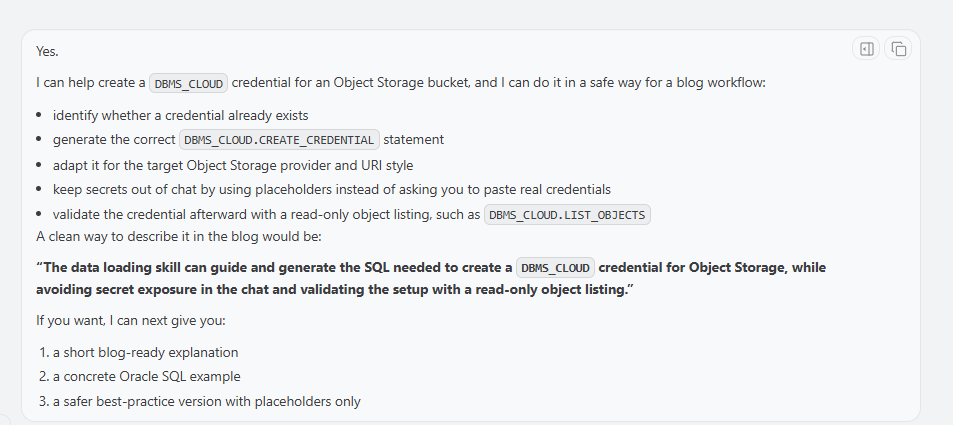
Then a simple prompt could be:
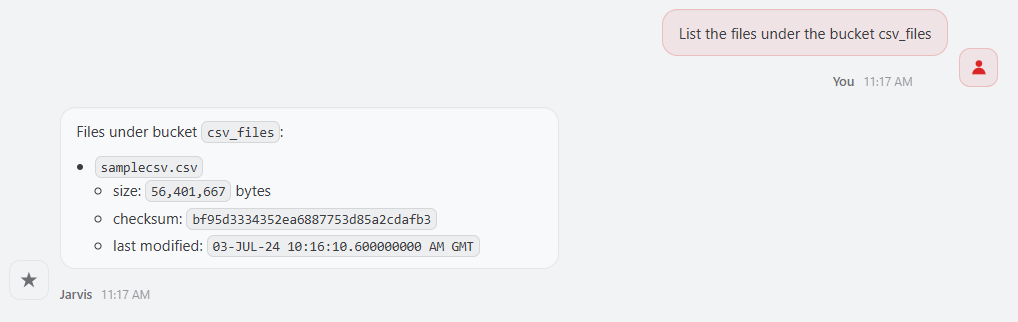
The skill can use DBMS_CLOUD.LIST_OBJECTS to inspect the prefix before doing anything else. This matters because a bucket may contain data files, marker files, manifests, empty files, or files with different formats. The skill should not blindly load everything it sees. It should help decide whether to load one file, a selected list of files, or a homogeneous folder of files.
Another example would be:
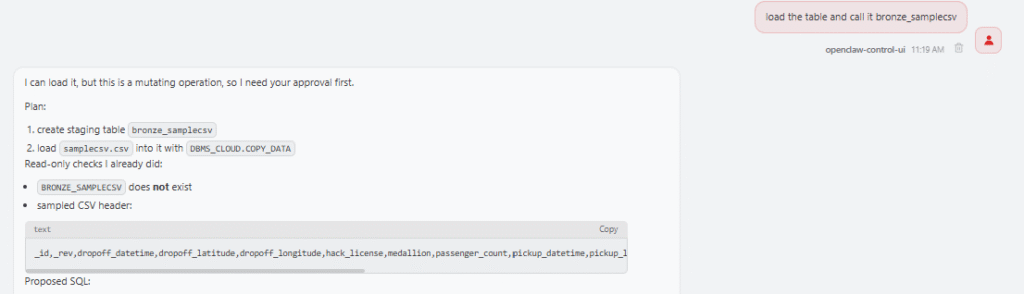
In this case, the skill can check whether the target table exists, generate the DBMS_CLOUD.COPY_DATA call, include the right format options, and prepare the monitoring queries for the load operation.
CSV is more interesting because it does not carry reliable type information. If I ask OpenClaw to load a CSV file from a bucket and I do not have a target table, the skill should not pretend that it can magically infer a perfect relational model. A CSV header can provide column names, but not reliable types. A column that looks numeric may contain non-numeric values, a date column may contain several formats, and a text column may be longer than expected.
In that case, the skill proposes a conservative approach: read or provide the CSV header, create a staging table with VARCHAR2 columns, load the file with DBMS_CLOUD.COPY_DATA, inspect the load result, profile the data, and propose a curated table afterwards. This is exactly the kind of workflow that belongs in a skill because it captures a repeatable decision process, not only a SQL command.
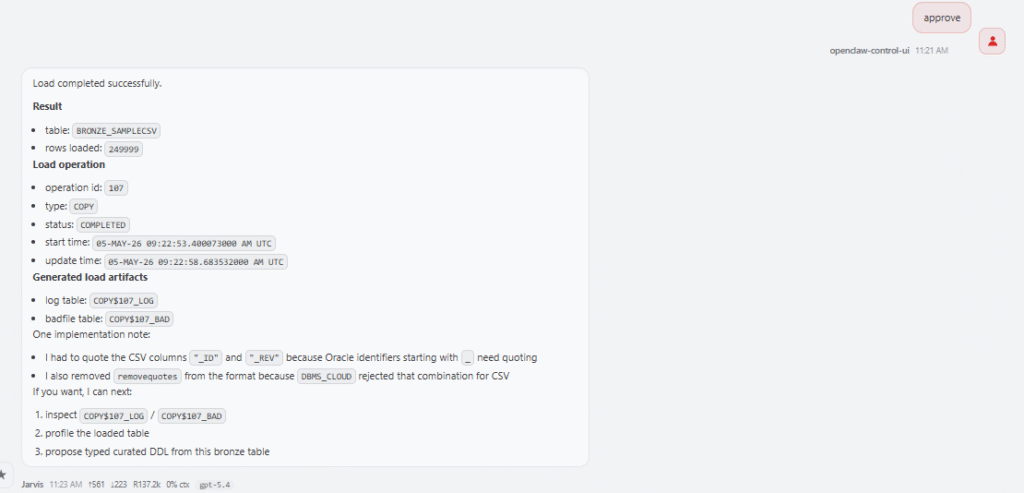
The Data Loader skill also helps when a load fails. I can ask:
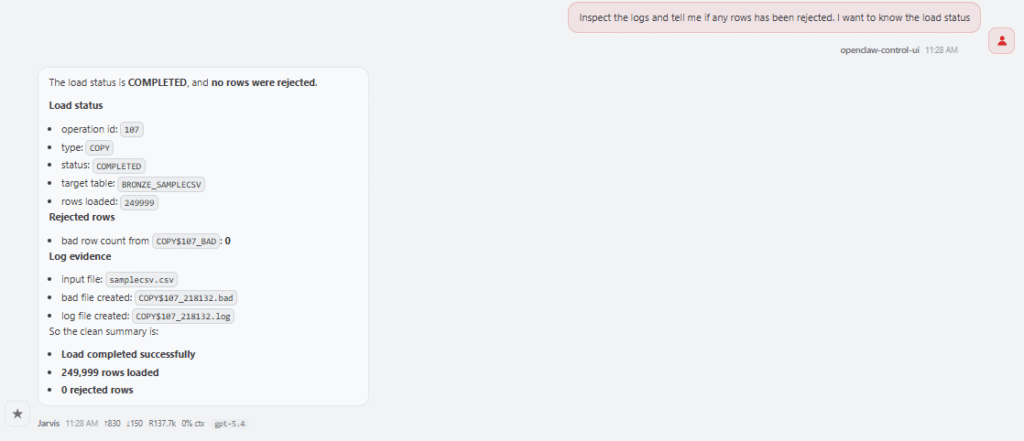
The skill knows to inspect USER_LOAD_OPERATIONS or DBA_LOAD_OPERATIONS, locate the log table and badfile table, summarize rejected rows, and suggest possible format changes. A failed load may be caused by a wrong delimiter, unexpected quotes, timestamp format mismatch, missing columns, values that are too long for the target column, or conversion errors. Instead of starting from scratch, the skill follows the same troubleshooting path every time.
I also added support for Iceberg access in OCI Object Storage. In this first version, I only wanted to cover the OCI Object Storage scenario. The skill can help create an external table over Iceberg metadata, for example using a metadata.json file, so Autonomous AI Lakehouse can query Iceberg data without physically loading it into an internal table. A prompt could be:
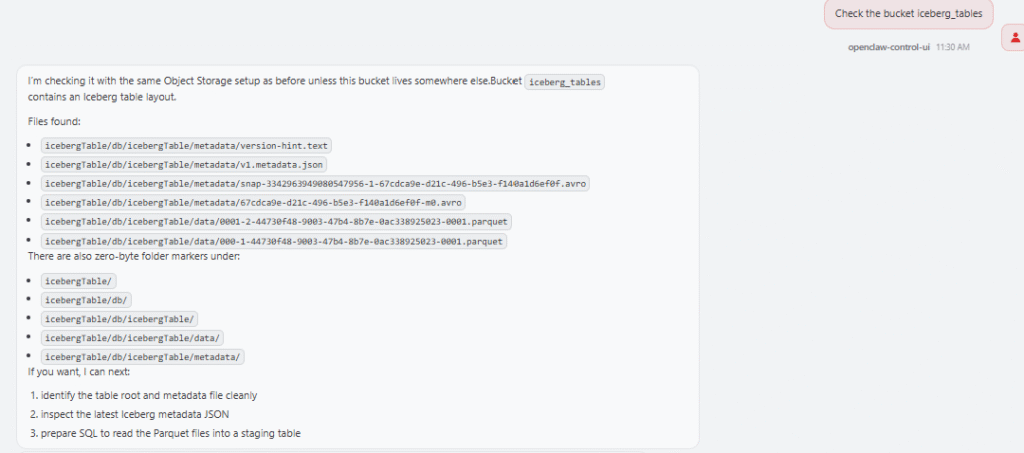
The skill will generate the right external table to work with Apache Iceberg:
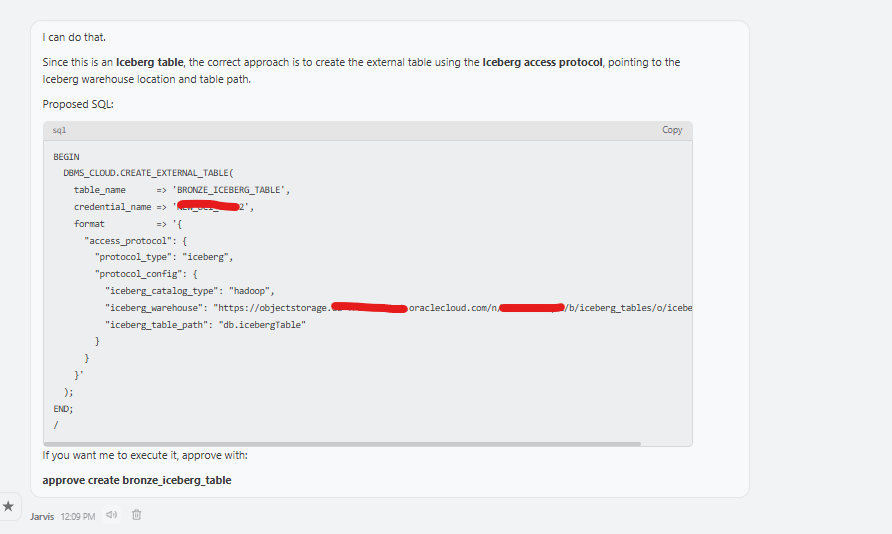
This is not the same as COPY_DATA. It is query access to external Iceberg data, and that distinction is important. The skill keeps it clear.
The second skill is Autonomous Ops Watch. This skill focuses on operational visibility. Its purpose is not to change configuration, restart databases, scale resources, or certify that an environment is ready for patching. Its purpose is more precise: show SQL-observable operational evidence from one connected Autonomous AI Lakehouse.
This skill is read-only in version 0.1. It does not use OCI API, OCI Events, Console, CLI, Resource Principal views, or external schedulers. It does not execute lifecycle actions. It only uses SQL evidence from the connected database.
That constraint is intentional. A SQL-only skill cannot see the whole application, the connection pools, the business window, external jobs, network dependencies, or every downstream consumer. Because of that, it should not say that the system is healthy, ready for patching, or safe to proceed. Instead, it should say something much more precise: based on SQL-observable evidence, this is what I found.
The skill can inspect maintenance notifications with DB_NOTIFICATIONS, patch details with DBA_CLOUD_PATCH_INFO, lockdown profile errors with DBA_LOCKDOWN_ERRORS, client errors with V$CLIENT_ERRORS, Oracle Cloud Operations access with DBA_OPERATOR_ACCESS and DBA_CLOUD_CONFIG, unified audit events with UNIFIED_AUDIT_TRAIL, active and blocking sessions with V$SESSION, invalid objects and compile errors with ALL_OBJECTS and ALL_ERRORS, and table or partition access statistics on demand.
A general prompt could be: give me a ops summary of my ADB
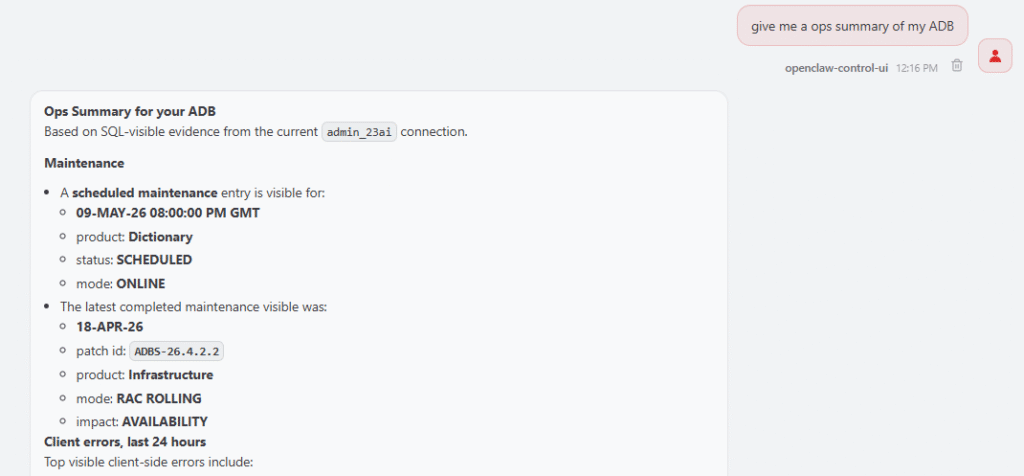
The skill then checks the most relevant evidence sources and summarizes what it finds. For example, if I ask when the next maintenance window is, the skill can inspect DB_NOTIFICATIONS and summarize the next scheduled maintenance, the latest completed maintenance, and the patch identifier if one is available.
The skill should not dump every row. It aggregates the result and shows the total visible errors, the top error numbers or messages, the affected users or modules, and the latest occurrence timestamp. The same pattern applies to lockdown profile errors, which are especially useful in Autonomous environments. Sometimes a workload fails because it tries to use an operation restricted by the Autonomous service lockdown profile. The error may look like a normal application failure at first, but the root cause is really an unsupported or restricted operation.
The skill also helps inspect Oracle Cloud Operations access: Has Oracle Cloud Operations accessed this database recently?
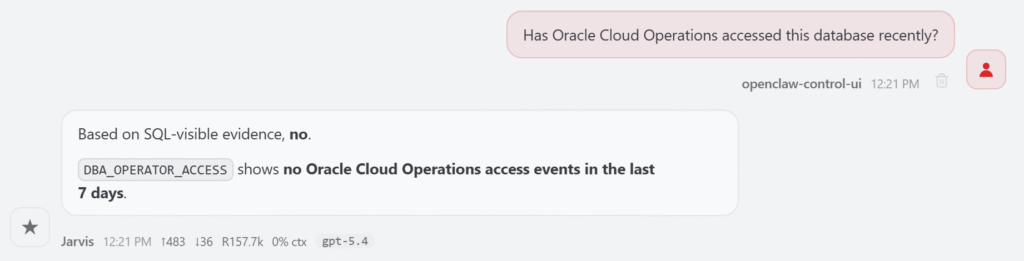
It checks SQL-visible evidence and summarizes recent operator access activity if available. For sessions, I can ask it to show active sessions, long-running sessions, and blocking sessions right now. The skill uses V$SESSION to provide a current snapshot. It does not list all inactive sessions by default, because that can create too much noise. If I want to investigate connection leaks, I can ask for inactive sessions explicitly.
For invalid objects, I can ask: Show me a summary of invalid objects.
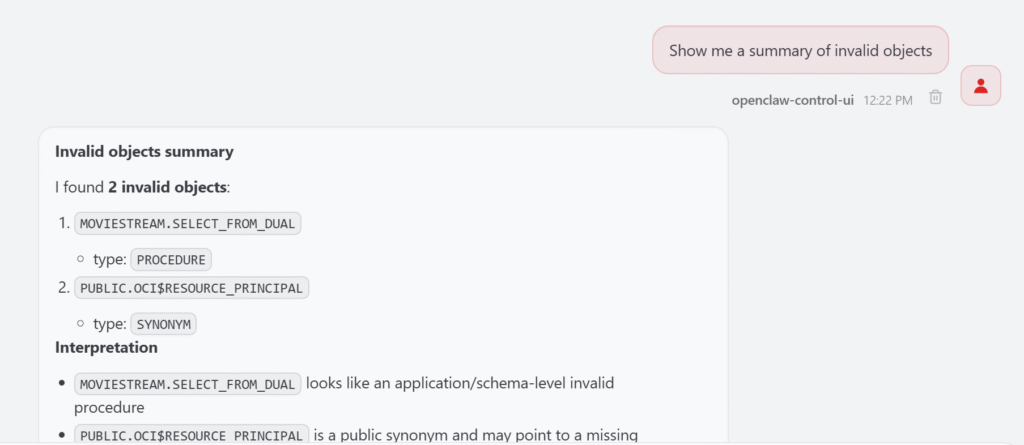
The skill first aggregates by schema and object type. If there are hundreds of invalid objects, it does not print everything. It gives a readable summary and lets me drill down later, for example by asking for invalid objects in a specific schema.
That is the pattern I want from an operations skill: start with the signal, show the source, summarize clearly, and allow drill-down.
Why skills instead of one big assistant?
One design decision I made early was not to create a single giant “Autonomous Lakehouse Assistant.” That would be tempting, but I think it would become hard to maintain and harder to trust.
The Data Loader skill knows about Object Storage, DBMS_CLOUD, file formats, staging tables, load operations, badfiles, JSON collections, and Iceberg access. The Ops Watch skill knows about SQL-visible operational evidence, maintenance notifications, client errors, lockdown profile errors, audit records, sessions, blocking sessions, invalid objects, and access statistics. Those are different responsibilities.
Keeping them separate makes the control room easier to reason about. The data loading skill should not audit operator access. The ops watch skill should not run COPY_DATA. A future sharing skill should not diagnose blocking sessions, and a future governance skill should not manage raw data loading.
This is how I want Lakehouse Control Room to grow: one focused skill at a time. Small skills, clear boundaries, and better outcomes.
What comes next?
This is only the beginning. The first version starts with operations and data loading because those are the two questions I care about first: can I load data, and can I understand what happened?
But the control room can grow naturally. The next skills could focus on catalog discovery, data quality, data product publishing, dataset sharing, metadata documentation, governance checks, performance evidence, and transformation workflows. Each one should have a clear scope and a clear contract.
I do not want OpenClaw to become a vague assistant that says smart things about the lakehouse. I want it to become a control room made of practical skills that help with specific parts of the lifecycle.
A lakehouse is not useful because the architecture diagram looks good. It becomes useful when you can operate the first loop: connect, inspect, load, validate, troubleshoot, observe, and improve.
That is what Lakehouse Control Room is trying to make easier.